The same engine on every platform; the cards say where a feature differs by device.
Native libmpv engine
Every channel plays through libmpv, the playback core behind mpv, not a browser wrapper or an ExoPlayer port. The same engine runs on every platform, picture filters included. Atmos and DTS-X passthrough and scheduling a recording in advance are the two things not on the Mac build.
Bitstream Atmos, DTS-X and TrueHD go untouched to your AV receiver on Windows and Android TV. Off by default; it needs hardware that can decode the format.
Interlaced sport feeds, deinterlaced on the device
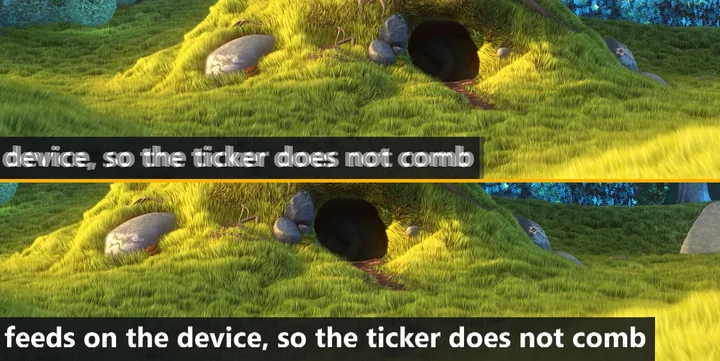
Most live sport and news channels still arrive as 1080i or 576i. Played as they come, anything that moves (the ticker, a camera pan, a sprinting player) shows comb lines. Nightmare TV deinterlaces these channels on the device, at single or double rate (Settings, Player, Deinterlace), so the picture on a 4K screen stays clean.
Top: deinterlacing off, the moving ticker combs. Bottom: the same 1080i feed with deinterlacing on, on Windows. Test feed generated from an open Blender film.
Live TV
Live TV and navigation
IPTV recorder (DVR), no server needed
One click records the live channel straight to disk with no re-encoding, and the guide schedules future recordings on Windows and Android. On Windows the app has to be running. Recordings land in the Ghost Tape library, where you can bookmark moments inside them. Included in every plan.
Type what you want in plain words, such as “tonight football” or “now news”, and the guide search works out the time window and the topic. It runs offline, in every interface language.
Favorites, watch history, profiles and settings follow you to your other devices, encrypted on the device first. Playlists and Xtream logins do not sync: you add them on each device.
Profiles with a PIN, a kids mode with category locks and a daily time limit, per-channel locks and a startup PIN, so you can hand over the remote without worry.
Nightmare TV has no iPhone, iPad, Apple TV, Samsung or LG app, and we never imply one exists. On those TVs an Android TV box on a second HDMI input runs the full app. Prefer numbers to claims? Our open IPTV player benchmark method lists the exact adb commands and a blank scorecard, so you can measure channel zapping, memory, guide loading and cold start on your own hardware.
Everything else: watching
While you watch
Picture, timing and recording tricks for the channel on screen.
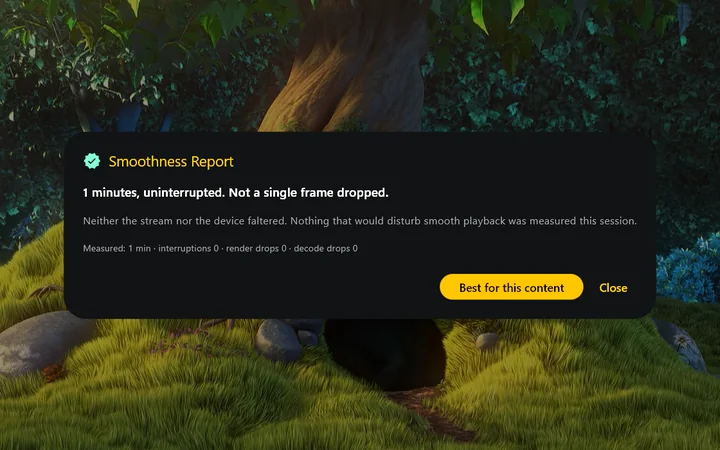
The smoothness report after a minute of playback on Windows: no interruptions and no dropped frames.
Timeshift on live TV
Pause a live channel, rewind through what you already watched, then press one button to return to the live edge. It runs on your device, so it needs nothing from your provider.
Keep a second stream floating on top of other windows, with pinch-zoom, an A-B loop, 0.25x to 4x speed and frame-by-frame stepping.
Matches your screen to the film
A 24 fps film on a 60 Hz screen cannot give every frame equal time, and the eye reads that as judder. The app works out the rate that divides evenly and switches your display to it in one press: refresh rate only, never the resolution, and it puts it back when you leave.
Smoothness report
Every session is measured. If something stuttered it names which part gave way (the stream, this device, the decoder or your screen) and shows the raw counts, so you can check the verdict instead of trusting it.
Split-screen comparison
Split the picture down the middle and watch the same stream with a processing setting on and off: on your own channel and your own screen.
Watch and record on one connection
Recording normally opens a second stream, which a single-connection account will not allow. Here the recording needs no second connection, so you can record the match you are watching.
Everything else: control
Control over your channels and lines
Tidy the playlist, fix timing, and keep a dropped line from ending the show.
The same guide on a Windows desktop. Real app screen, illustrative room.
Country filter
One-tap country chips above every category grid for live channels, films and series, detected from the prefixes already in your playlist, such as US| or TURKISH.
Hide and rename channels, hide channel groups or move them up and down, and pin countries in your own order, without touching the source M3U. Picture mode and field order are remembered per channel.
Audio and subtitle delay, subtitle size
Sliders in Settings, Player for a receiver that shifts the sound, a provider that times subtitles early, or a TV three metres away.
Automatic failover
Add a backup server once. When a line drops, Nightmare TV switches to the next one and the show keeps playing.
Eight questions people actually arrive with, each answered in place, a quick tour of where every feature lives, a connection test that never writes your username or password into its report, and a support draft that you send yourself.
Laptop on battery stays smooth
On Windows, pulling the charger does not by itself make playback choppier. The optional Protect the picture on battery switch, off by default, eases picture processing when the battery runs low or the machine heats up, and it all comes back when you plug in.
One license, several devices
The yearly and $55 lifetime plans activate 5 devices, the monthly plan 3: your PC or Mac, your TV and your phone on one purchase.
Nightmare TV plays every stream through the native libmpv engine, the playback core behind mpv, not a browser wrapper or ExoPlayer. On Windows it decodes HEVC Main10, AV1 and H.264 in hardware, so 4K streams play with low CPU use.
Does Nightmare TV support HDR and Dolby Atmos?
Yes. Nightmare TV applies BT.2390 HDR tone-mapping on Windows and macOS so HDR10 streams look correct on SDR and HDR displays, and it can bitstream Dolby Atmos, DTS-X and TrueHD to a capable AV receiver on Windows and Android TV, as an opt-in setting. The Mac build decodes these formats itself instead of passing them through.
Which platforms can run Nightmare TV?
Windows 10 and 11 (64-bit), macOS 13 or newer, Android phones and tablets with Android 7 or newer, Google TV and Android TV, and Fire TV with Fire OS 6 or newer. There is no iPhone, iPad, Apple TV, Samsung or LG app; on those TVs people use an Android TV box on a second HDMI input. Supported devices
How does the free trial work?
Every feature is unlocked for 7 days, with no card and no account. The 7 days start with your first playback, not at install. When they end you can buy a license or simply uninstall.
Nightmare by name. A dream by nature.
Try the whole thing free
Every feature unlocked for 7 days, no key, no card. Bring your own M3U or Xtream Codes playlist.
Built by Tevfik Çapar. Tested on a Windows 11 laptop, a OnePlus 9 Pro, a Fire TV Stick and a Mac. Questions: support@nightmaretv.net. Page updated October 14, 2026.